How your Home works
When you are signed in at a studio, Home is the first page you see: what needs you today, your next session with a countdown, what you owe if anything, and today’s bookings. Paying never happens on Home: Pay opens the booking, or the daily or weekly bill, where the amount is confirmed.
In this section
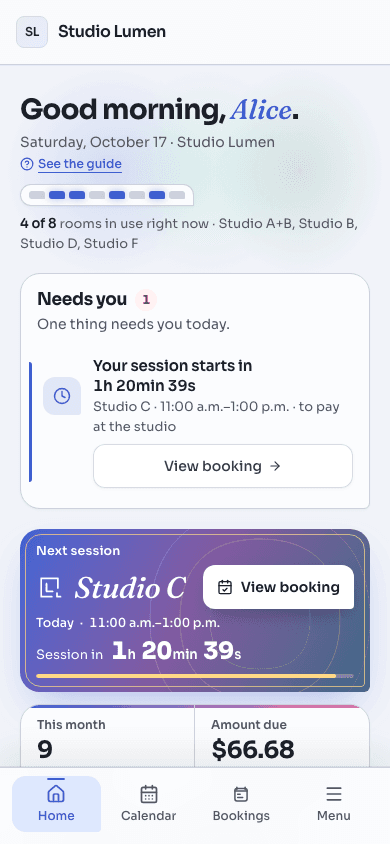
Home gathers what is yours at this studio, in the order you would deal with it. At the top, a strip shows which of the studio’s rooms are in use right now, by name only: never who is in them.
ExampleCamille, a session today and $51.74 due
It is late in the morning. Camille rehearses in Studio B today from 2:00 to 4:00 p.m. The charge for last week’s session was declined on her card on file, so $51.74 is still owed.
- “Needs you” lists two things, money first: “A payment did not go through · $51.74”, then “Your session starts in 2h 14min 05s”, counting down. Only today’s next session is listed there; a session on a later day shows in the Next session card instead.
- Next session shows Studio B, “Today · 2:00 p.m.–4:00 p.m.” and the same countdown to the start. View booking opens that booking’s page.
- Amount due reads $51.74, the same figure as the payment card. Pay now, Pay and Pay $51.74 all open last week’s booking, on its payment: the amount is shown there and she confirms it there. Home itself never charges a card.
- Update card opens her profile, where the card on file is managed. It is offered because a declined card is the problem. A balance that is simply paid at the studio has no Pay button: its card reads “To pay at the studio” and offers View booking.
- Her session today is not at risk: the card says “No rush: your booking is kept.”, and no booking is cancelled because a payment failed.
- Once it is paid, the payment line leaves “Needs you”, Amount due reads “Nothing due”, and the payment card points to her receipts.
What counts as due is what nobody else is already collecting. A session whose card charge is still scheduled or under way is not shown as owing, and neither is one that sits on a daily or weekly bill; if that bill’s own charge fails, the bill is the line you see. Pay on a bill opens it in My bookings. A bill with no card saved for it is settled with the studio: it has no Pay button, and its card offers View bill.
“My bookings today” lists today’s sessions with a tag on each (Next, Now, Done, Hold), and the quick actions go to the calendar to book a room and to the full list of your bookings.
Still stuck? Write to support@quorin.studio.