Sell tickets to your class on the studio’s page
Make a booking public and it is listed on the studio’s public classes page, beside the studio’s own classes, where anyone who comes to the studio’s site can find it and buy a ticket online. Customers pay by card when they buy, before the class, so there is nobody to chase for the money.
In this section
Why make it public
- Your class is listed on the studio’s public classes page, beside the studio’s own classes, and anyone can open that page without signing in.
- Customers pay by card when they buy their ticket, before the class: nobody to chase.
- You know who is coming, and you check people in from your phone, by QR code or by name.
- Quorin’s fee is taken on the paid tickets you sell, and a free class carries none.
How it looks to the public
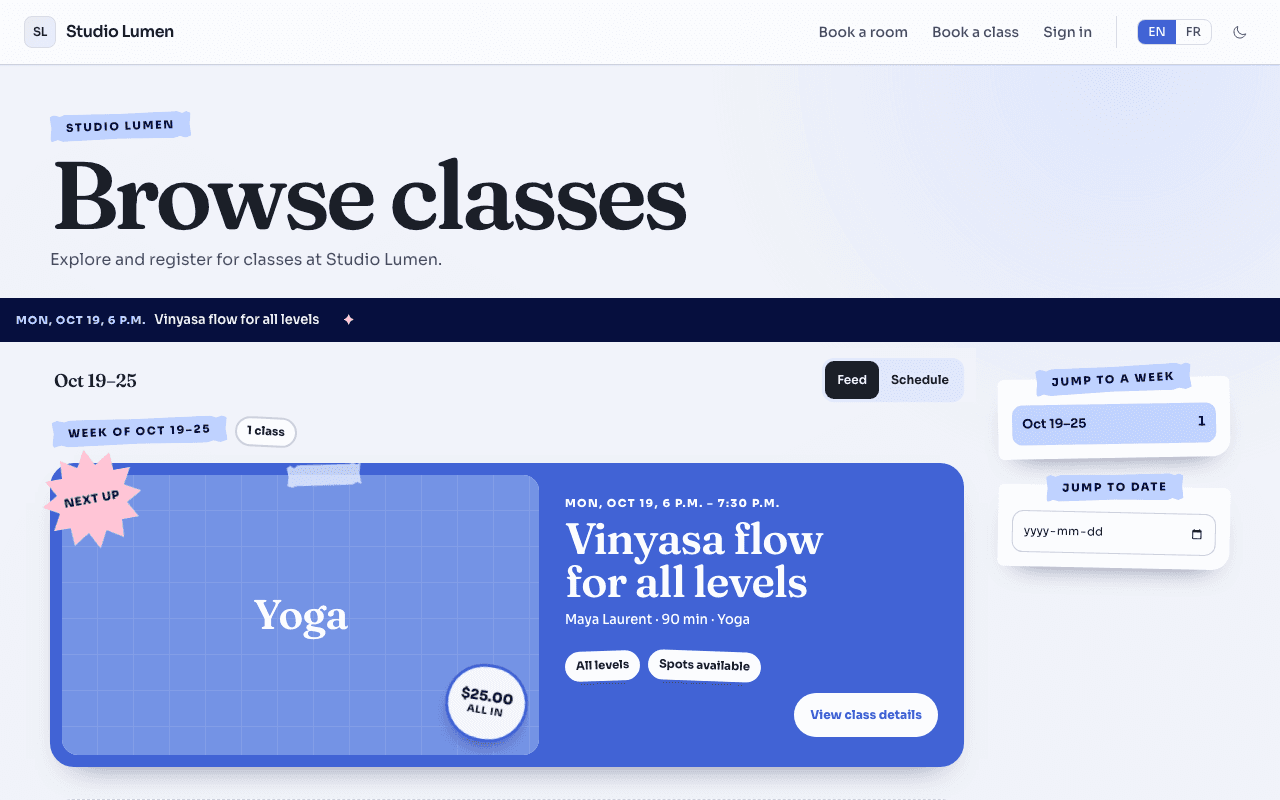
This is how your class looks on the studio’s classes page, which anyone can open without signing in.
Each class is a card: its cover, date and time, title, who runs it, its price and whether spots are left. The price is all in, with the taxes inside it and no fee added at checkout. Open the card and the visitor sees your description and the dates, with a “Buy tickets” button.
How it works
From your booking to the first person through the door.
- Book the room as you usually do. At a rate your studio has opened to public classes, the booking form has a “Make this class public” switch, off to begin with. You can also do it later, from the booking.
- If you have never sold a class, you are first asked to start selling: one field, the name customers will see, and you land back on your class.
- Describe the class: a title, a category, a level, the number of spots and the ticket price. A cover photo or short video, a description and a teacher are optional. Switch on “Free class” if nothing is charged.
- Before paid tickets can be sold, set up payouts once: your billing details, a public phone number and email that customers see, and Stripe’s identity check, which opens inside Quorin. You also accept Quorin’s organizer terms in the editor. A free class does not need payouts. For now, payouts are open to organizers based in Canada.
- Press Publish. The class is on the studio’s classes page at once, and tickets go on sale right away, unless you picked a later date or the class is more than 60 days away (sales then open 60 days before it).
- A customer opens the class, chooses “Buy tickets”, signs in or creates an account with a phone number or an email, names who is coming and pays by card. Each person gets a ticket with its own QR code, in the customer’s account.
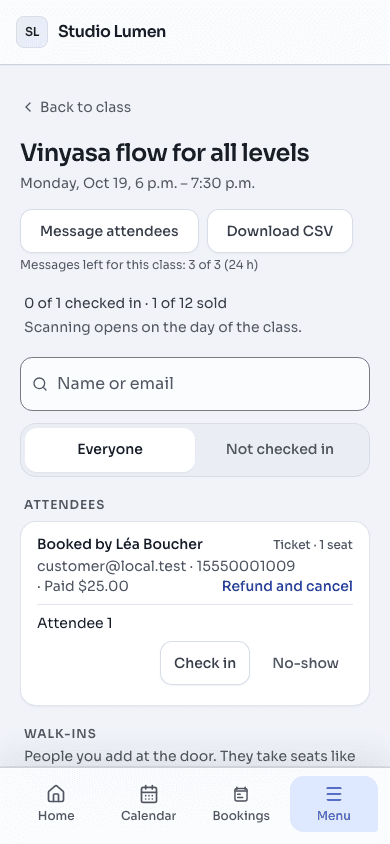
- On the day, your Home lists the class under “My sessions today”. Scan each ticket’s QR code with your phone’s camera, or check people in by name from the roster. A counter shows how many have arrived.
In the class editor, under Spots, turn on Balance women and men to ask customers to choose Woman or Man for each spot. A customer whose whole order does not fit can join that date’s waiting list. When spots become available, the first eligible waiting order that fits may receive an email offer. Follow the offer’s expiry time: the hold does not restart when the email arrives. Passes have no waiting list. Your session roster shows each spot’s side, including No side for unassigned spots, and waiting-list counts rather than names.
What to expect
- Money in. Customers pay the price you set, taxes included, and no fee is added on top. The money goes to your own Stripe account, and Stripe pays it out to your bank on its automatic payout schedule. The studio takes no share of ticket sales.
- Money out. On each paid ticket Quorin keeps a fee of 5% of the price (not counting any sales tax inside it), plus the tax that applies to that fee, and Stripe’s card processing fee comes out too. A free class carries no fee. Your Earnings page shows what was sold, and a monthly statement lists the fees Quorin took.
- If a customer cancels. They can cancel from their own account until 24 hours before the class (a series pass: until 24 hours before its first class) and get everything back, taxes included. It is automatic and you carry the cost: Quorin keeps its fee, Stripe’s fee is not returned, and the refund comes out of your Stripe balance. After those 24 hours, a refund is for you to decide.
- If you or the studio cancel. A class has no cancel button: you cancel the room booking, and the studio can cancel it too. When that happens before the class starts, every customer who bought a ticket is refunded in full, automatically, and told the class was cancelled, and Quorin gives back its fee and the tax on it. Stripe’s card fee is not returned, and the refunds come out of your Stripe balance. Your booking still follows the studio’s cancellation policy.
- Once a ticket is sold, the room, the date and the time are locked. To change them, cancel the booking, then book and publish again.
- Unpublishing takes the class off the page and stops new sales. Tickets already sold stay valid.
- Who sees what. You see who bought, with their name and the email or phone number on their account, on each class’s roster. Customers see your seller name and the public phone number and email you gave. The studio sees how many tickets are sold, never who bought, and can take your class off its page at any time; you cannot publish it again until the studio allows it.
- What stays the same. It is still your room booking: making it public does not change what you pay for the room or the studio’s rules. While the class is published, the booking must stay at a rate that allows public classes.
ExampleMaya’s Saturday workshop in Studio B
Maya books Studio B for Saturday, 10:00 to 11:30 a.m., at a rate the studio has opened to public classes. She makes the booking public: “Vinyasa flow for all levels”, 12 spots, $25.00 a ticket. She is not registered for sales tax, so no tax line shows.
- The class is listed on the studio’s classes page with “$25.00 all in” and “Spots available”.
- Over the week, eight people buy a ticket. Each pays $25.00 by card, so $200.00 is collected.
- On each ticket Quorin keeps 5% of $25.00, which is $1.25, so $10.00 on the eight, plus the tax on that fee. Stripe’s card fee comes out as well. The monthly fee statement lists Quorin’s fee and the tax on it.
- On Thursday one of them cancels from their account, more than 24 hours before the class. They get their $25.00 back in full. Quorin keeps its fee and Stripe’s fee is not returned, so Maya carries both, and the refund comes out of her Stripe balance.
- Seven tickets remain. Counting only what is above, Maya is left with $165.00 ($200.00 collected, $25.00 refunded, $10.00 of Quorin’s fee), before the tax on that fee and Stripe’s card fees. Stripe pays her balance out to her bank on its automatic schedule.
- On Saturday Maya opens Home, finds the class under “My sessions today” and taps “Check in”. She scans the seven QR codes, and the counter reads 7 / 7.
Where to start
Open an upcoming, confirmed booking from “My bookings” (Home shows today’s) and choose “Make this class public”. If you have never sold a class, the same place says “Start selling classes”. If the booking already has a class, it says “View listing”. If you do not see it, the booking has already started or is not confirmed, it is one date of a weekly series (the series itself is offered), its rate does not allow public classes, or the studio has not opened classes to renters: ask the studio. A weekly series is made public the same way, from the series’ own page, and can also sell one pass for the whole series.
Still stuck? Write to support@quorin.studio.