Linked rooms
Two rooms are linked when they cannot both be used at the same time. Booking either one takes those hours off the other’s calendar.
In this section
Quorin treats every room as its own bookable space, with its own name, rates and rules. Linking is how you say that two of those spaces are really the same square footage: a wall that opens, a control room two live rooms share, a loft you sometimes rent whole and sometimes rent by the corner.
ExampleStudio A + B
Studio A and Studio B sit side by side and the divider between them opens, so you also rent the pair as one large room.
- Create three rooms: Studio A, Studio B, and Studio A+B. The combined room is a room like any other — give it its own capacity and its own rates, because a band renting the whole floor should not pay the price of half of it.
- Link Studio A+B to Studio A. Then link Studio A+B to Studio B. Two links, not one.
- Someone books Studio A+B on Saturday at 2 p.m.: 2 p.m. disappears from Studio A and from Studio B.
- Someone books Studio A alone at 2 p.m.: 2 p.m. disappears from Studio A+B, and Studio B stays free for whoever wants it.
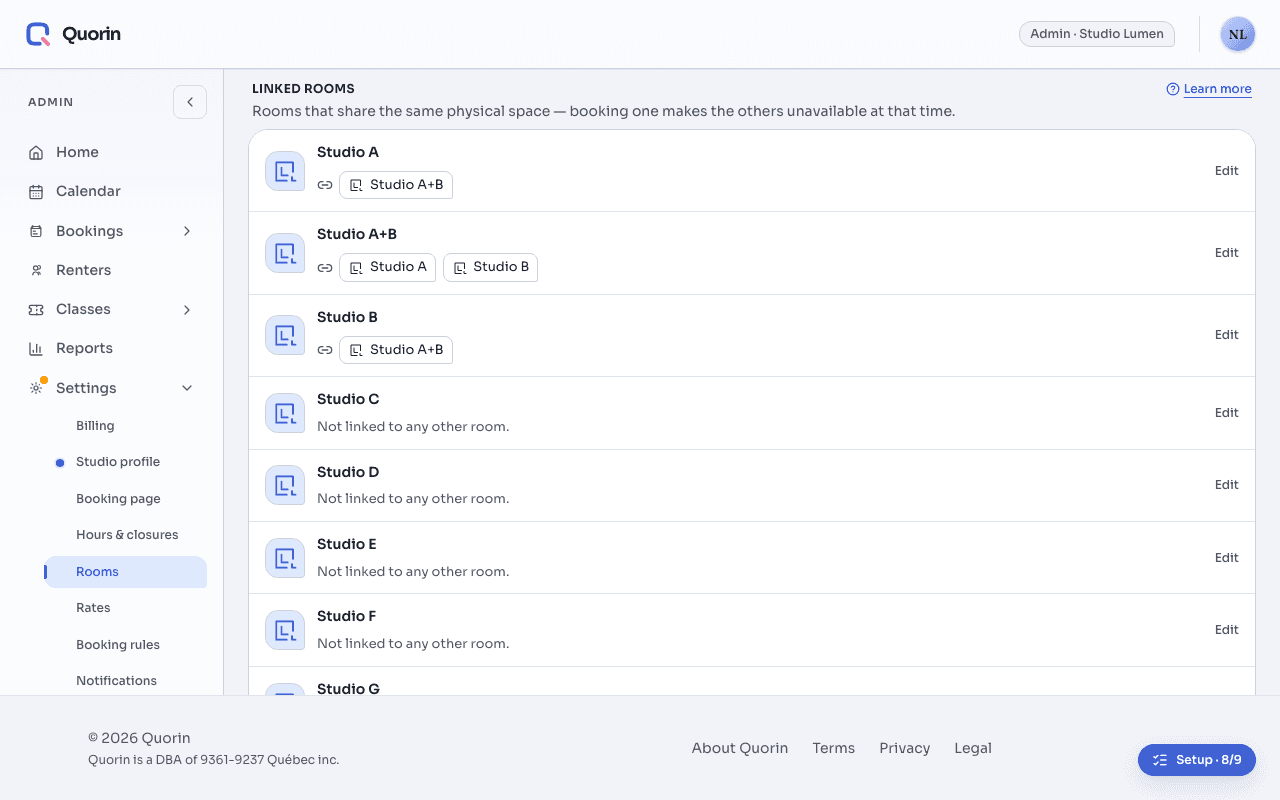
Links are two-way, so you only ever make one: linking A+B to A links A to A+B at the same time. They are not passed along, though — linking A+B to A, and A to B, does not link A+B to B. Link the combined room to every room it swallows, or the one you skipped will keep selling hours you cannot deliver.
Linking only decides what is free. Rates stay with each room; business hours and the cancellation policy belong to the whole studio, not to a room; and a link never moves a booking from one room to another.
Still stuck? Write to support@quorin.studio.