How the Home page works
Home is the page a studio’s team opens on after signing in. It puts what needs someone first (money to collect today, bills whose charge failed), then today’s numbers, the day’s classes and the rooms in use right now. Every figure is read from the studio’s bookings and bills; there is nothing to configure on it.
In this section
The page is ordered by urgency, not by topic. One sentence under the greeting says what is waiting, and the row of chips under it gives the counts and leads to each one. Money comes first because it is the one thing that gets harder to ask for once the renter has left.
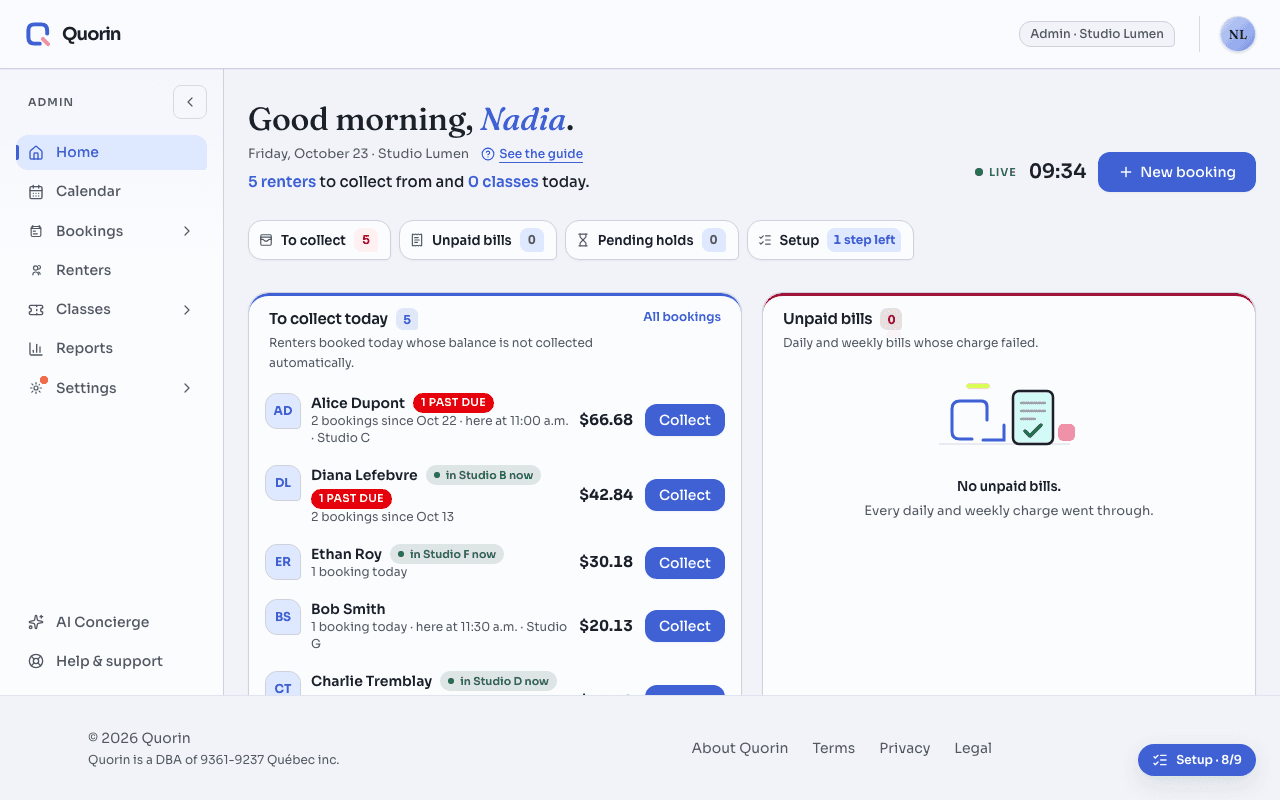
ExampleStudio Lumen, a Friday at 10:47 a.m.
Studio Lumen has eight rooms and runs classes. This Friday three renters booked today still owe something, one weekly bill’s charge failed on Monday, and four rooms are busy.
- To collect today lists three renters, largest amount first: Samuel Okafor $103.48, Marie-Ève Tremblay $86.23, Chloé Gagnon-Roy $51.74, which is $241.45 in all. Each is booked today and owes a balance that nothing is set to collect automatically. Chloé’s $51.74 is last Thursday’s booking, never paid: it is flagged past due and counted, because she is booked again today.
- Two renters booked today are not in that list. Olivier Bédard has a card on file whose charge is still scheduled: the system is collecting it. Les Ateliers Mosaïque is billed by the week: its bookings go on the weekly bill, never under To collect.
- Unpaid bills holds one: Studio Danse Nord’s weekly bill, $517.39, whose charge was declined on Monday. A daily or weekly bill lands here when its charge fails or a correction reopens it, and this is where it is charged again or settled by hand.
- Live now reads “4 of 8 rooms in use” and names who is in each room and until when: Studio A, Marie-Ève Tremblay until 12:30 p.m. It is a snapshot, stamped with the time it was read (“Snapshot 10:47”): it changes when the page is loaded again, not by itself.
- Lower on the Home page, a section called “For your studio” suggests “Renters can book by chatting”. The owner dismisses it: the card is hidden on her phone and on her laptop, because a dismissal is kept with her account. Another admin still has the card until they dismiss it themselves.
- The front desk, using a staff account, sees the same three renters and amounts to collect and the same unpaid bill, in another order: the day’s classes and the rooms come before the numbers. Staff see three numbers (two in a studio without classes): bookings today, check-ins today, rooms in use now. Getting started is the one section only admins get, since setting the studio up is theirs.
“Collect”, on a renter’s row, opens a panel with what that renter owes today, taxes included, and three ways to collect it at the desk: charge the card on file, text a payment link, or record a payment received in person. Charging a card and texting a link each ask first: the card’s confirmation names the amount and the card, and nothing is charged until you confirm. What the panel did is written in the panel, one sentence per booking, and a receipt is issued as soon as the money lands.
A part of the page that could not be read says so, in its own panel, and shows a dash where its number would be. A dash is never “nothing to collect”: reload the page before acting on it.
Still stuck? Write to support@quorin.studio.