Your Quorin plan and fees
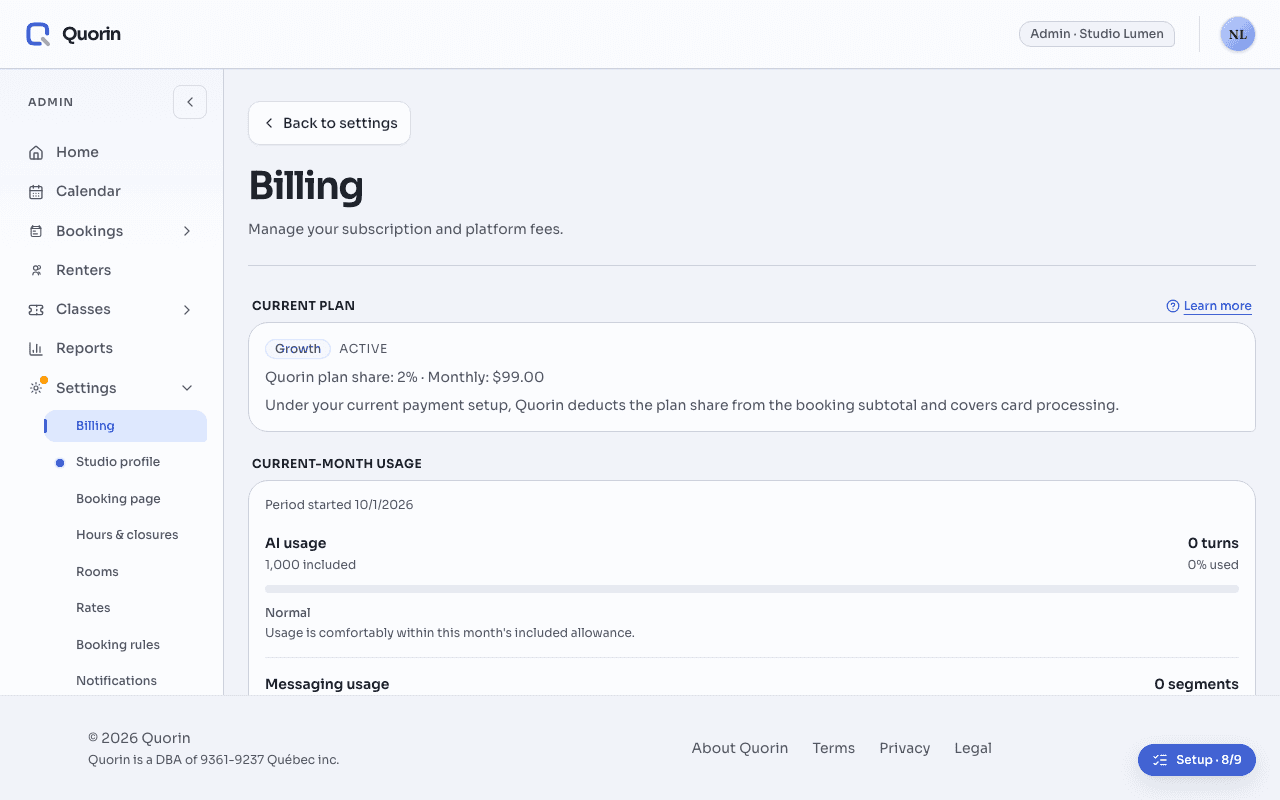
Quorin has three plans: Starter, with no monthly fee and a 7% commission; Growth, US$99 a month, with 2%; and Scale, US$249 a month, with 0%. The commission is a share of each card payment’s booking subtotal before tax. An admin changes the plan, and the card it is billed to, in Settings › Billing.
In this section
The three plans
- Starter: no monthly fee, with a 7% commission.
- Growth: US$99 a month, or US$990 a year, with a 2% commission. It adds your own brand color and font.
- Scale: US$249 a month, or US$2,490 a year, with a 0% commission. It adds a custom booking domain and priority support.
Every plan has online booking with Stripe payments, recurring bookings, the AI booking assistant, unlimited rooms and admin seats, and reporting with CSV export. What branding each plan gives is in Custom domain and branding.
Each plan also includes a monthly amount of text messages and AI assistant use. Booking messages keep sending past it, with or without a card. With a card on file for your plan, the AI assistant keeps answering too, up to a monthly safety limit; without one, it pauses until next month. While a subscription is past due, the studio keeps its plan’s included use, but the assistant pauses once that allowance is reached, even with a card. Booking messages keep sending without extra usage charges during that time. When your studio goes past what its plan includes, Quorin emails your admins, and Current-month usage on the Billing page says whether extra usage is billed on your next invoice or keeps working at no additional charge.
Quorin’s commission
- It is taken from each card payment for a booking, as your plan’s percentage of the booking’s subtotal before rental taxes. A payment that covers only part of a booking, such as a balance or the price of a change, pays the commission on its own pre-tax part.
- It is taken when the payment is processed, and refunding the booking does not return it.
- Payments you record, such as cash or your own terminal, carry no commission.
- With separate billing, taxes are added to the commission (GST and QST for a studio in Quebec), and Stripe bills its processing fees to your studio directly. Each month’s fees are on your Quorin fee statement.
- If your payment account is not yet on separate billing, the Current plan card says which arrangement applies: the plan share taken together with card processing of 2.9% plus 30¢, or, on the earliest payment setup, the plan share alone, with Quorin covering the processing.
- Class ticket and pass sales are different: Quorin’s fee is 5% of the price before tax, plus the tax on that fee, on every plan, Scale included, and a refund made in Quorin returns it unless the buyer cancelled their purchase themselves.
If your studio has custom pricing, the Current plan card says so, and the rate it shows replaces the plan’s.
How the plan is paid
Plans are billed in US dollars, plus applicable taxes, to the card under Payment method on the Billing page, never from your booking money. Update card changes it. Invoices lists each invoice with its status, and View receipt opens the receipt of a paid one.
On Starter, a card on file costs nothing by itself: past what the plan includes, it keeps the AI assistant answering, and Current-month usage says whether that extra use is billed. Booking messages keep sending with or without a card. Quorin asks for one while you set up your studio, and you need one before you first turn on online booking.
If a plan payment fails, the page shows Payment failed. While the subscription is past due, your studio keeps its plan’s commission rate, features and included usage. The AI assistant pauses at that allowance; booking messages keep sending, without extra usage charges during this time. Pay now pays the invoice there; unless your bank needs you to confirm the payment, Stripe also tries again on its own. Until it is paid, plan changes, including between monthly and annual, are paused. If Stripe cancels the subscription after its payment retries, your studio moves to Starter, with its commission rate, features and included usage.
Change your plan
Only admins can open Settings › Billing. Each plan card has Switch to and the plan’s name, and the paid plans can be Monthly or Annual (2 months free).
- A change to a live subscription first asks you to confirm. The confirmation says when the change takes effect and, on standard pricing, how your commission changes (not on the earliest payment setup).
- A move to a higher plan, or from monthly to annual, starts now: the prorated difference is on your next invoice.
- A move to a lower plan, or from annual to monthly, takes effect at the end of the current period, and you keep your plan until then. Cancel scheduled change undoes it.
- A 14-day free trial applies only to a paid plan chosen while setting up your studio.
ExampleStarter or Growth, on $3,000 a month
Your studio is in Quebec, on Starter, with separate billing and a card on file for the plan. Your renters’ card payments add up to about $3,000 a month in booking subtotals, before tax, in Canadian dollars.
- On Starter, that is $210 of commission a month before tax. On Growth it would be $60: $150 less in Canadian dollars, against the plan’s US$99 a month plus tax.
- On the 10th, you choose Switch to Growth. The confirmation says your commission changes from 7% to 2% and that it starts now. The prorated part of the month is on your next invoice, and card payments from then on carry 2%.
- Two months later you move back to Starter. The confirmation says your commission changes from 2% to 7% and when it takes effect, at the end of your billing period. Until then you keep Growth, and Cancel scheduled change would undo it.
Related
- Quorin fee statementsQuorin’s monthly fee statement lists its fees, and the taxes on them, already deducted from your studio’s card payments: one statement per month and currency. Admins open it in Settings › Billing, under Quorin fee statements, and can download it as a PDF.
- How the money reaches youStripe charges your renter’s card under your own business name and pays the money out to your bank. It never passes through Quorin.
- Custom domain and brandingEvery plan can show your logo. Growth and Scale also give your booking pages your own colors and font, and Scale serves your booking pages on a domain you own.
Still stuck? Write to support@quorin.studio.